Fuji Recipe Book Fuji Recipe Book
Favorites 16 Yours 0 People 75 Cars 15 Buildings 80 Street 14 Interiors 6 Flowers 12 Plants 76 Water 46 Skies 28 Mountains 45 Food 8 Animals 2 All 448

Classic Cuban Negative

Black Salt

Summer Made

Coral Negative

Kodak Softlight

Standard Provia

Old Kodacolor Tone

Cassette Print

Bleached City Tone

Atmospheric Daily

Budapest

Chrome Memory

Cinematic Gold

COASTAL Negative

Fuerte

Gold CC

High End

IVORY

Keylime Summer

KK1

Luce Classica

Mallorca

NOBOOK Club

Portra 400

Portrafornia

PRO Negative 160C

Savanna Chrome

Soft Look Film

SUSILO Film

Terracotta Sun

Trevi Chrome

WARM & RAIN

fragment acros

Fuji _Vivid Chrome

Amber Night 800

Patina Negative scsh

Velvia Dreams

Luce Classica

Velvia

Tokyo Neon Chrome

Kodak Portra 800 v3

GREG'S

Ilford Pan F 50 Plus

Vintage Kodachrome

Chicago Golden

oguzhantublek

Vibrant Astia Soft

Chrome Memory

Acros R B&W Warm

Acros Smoke Tone

Hard Light Chrome

Kodak Fine Mono

Blue Neg Hi

Superia 1600 Frosted

Cinematic Drama

Sunset Punch

NC Recipe Daylight

ZL Portra 400

Go to

Pushed Analog

Kodak Vision3 250D v2

KinaColor 26

Fujicolor Reala 100

Kodak Pro 400

1960 Chrome

Kodak T-Max 100 Hard Tone

Kodak T-Max P3200

Provia Positive

Pindrop Gold

Doha Classic

Via Roma

Kodachrome

Hy Contrast Bnw

Everyday

Portra by Branden

Meyerowitz

Dreamy Harm

Neopan 100 Acros II

Classic Negative 200 v...

NOAH Blalock

Connect your camera

Recipes are sent straight from this browser over USB. Four things need to be true before the camera will answer.

  1. 1
    Open this page in Google Chrome

    USB is only exposed over HTTPS or on localhost, and only in Chromium browsers. Chrome is the one to use.

  2. 2
    Plug the camera in over USB

    Use a data cable, not a charge-only one, and switch the camera on.

  3. 3
    On the camera go to Network settings › Connection Mode › USB RAW conversion.

    In USB card-reader mode the camera mounts as a disk and never answers as a device. Pick USB RAW conversion instead — the two screens look like this:
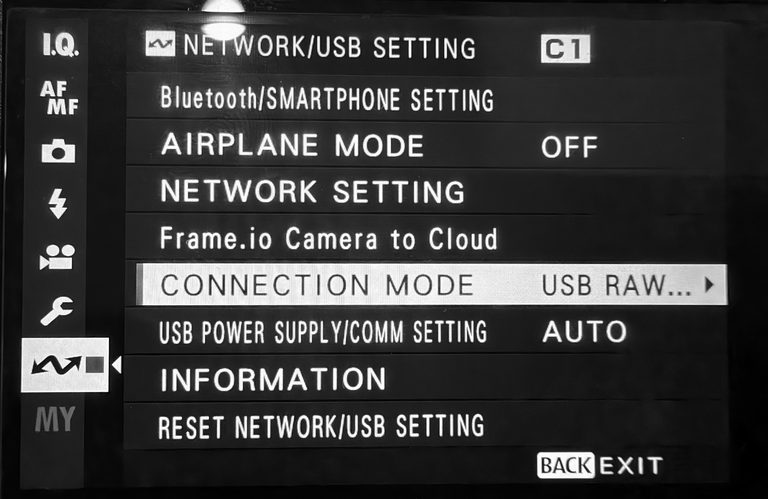
    Camera menu path: Network settings, Connection Mode, USB RAW
    Network settings › Connection Mode › USB RAW
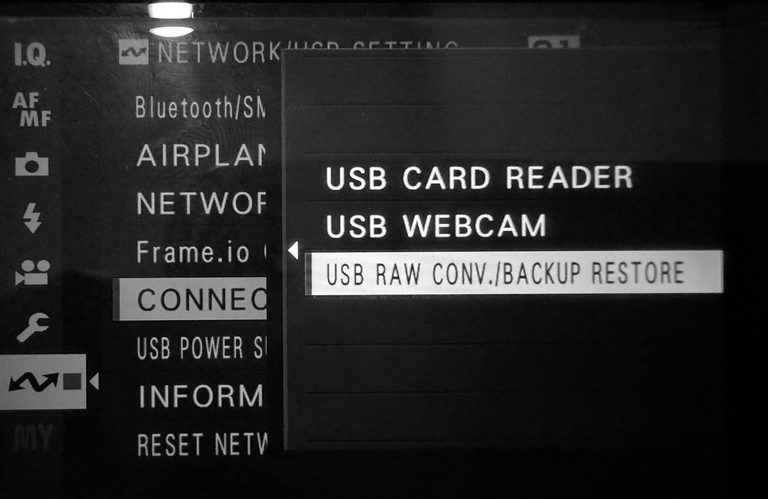
    Camera menu with RAW CONV. selected
    RAW CONV.
  4. 4
    Quit anything else holding it

    Photos on macOS, gvfs on Linux and MTP on Windows take the camera first. Close them, then reconnect.

Nothing connected yet. Steps 2–4 are on the camera; the button below connects it.

Extract Recipe from the Photo

Pick one Fujifilm JPEG. Its recipe is read from the EXIF data, the photo becomes the card's cover, and the recipe is filed under Yours.

More ways to import: a batch of images · recipe cards

    Uploading…

    Import Recipes from Images

    Select one or more Fujifilm JPEG files. The recipe settings encoded in their EXIF data will be extracted and saved — the image files themselves are not stored.

      © 2026 Johnyvino All recipes and photos belong to their original authors — see the credits.