Fuji Recipe Book Fuji Recipe Book
Favorites 16 Yours 0 People 75 Cars 15 Buildings 80 Street 14 Interiors 6 Flowers 12 Plants 76 Water 46 Skies 28 Mountains 45 Food 8 Animals 2 All 448

Cote d Azur Summer Chrome

Dreamy Negative

Dreamy Color

Essenza

Eternal Classic

Marigold Afternoon

Old Ivory Roll

Warm Monsoon Light

Astia Reverie

Kodak Sunwashed

Quiet Portra 170

Muted Halo Stock

Rich Velvia Stock

Saturated Velvia

Fine Grain Print

24/7 Chrome

African Negative

Alpine Negative II

Beanie Chrome

Chris Nostalgic Roll

Cito's porta 800

Crispy Cabin Chrome

Explorer Classic

Film Superia

Firenze

Gold Street Negative

KODACOLOR by Gerhart

Kodak 800 max

Kodak Colorplus

Kodak Portra do Sol

LM Negative

Lucid Summer

Mikes Cinew

Nostalgia Street Neg

Portra 800

PORTRA 800 harm

PORTRA Plus

Reala Royal

Soft Ember

ULTRA Velvia

Virgin Astia

AUTUMN EMBER

CUBAN NEG

Punch

Anime Sky Dream

Pacific Blues

Chumash

Explorer C

Crisp Daylight

Kodak Tri-X 400

Kodachrome 64 (X-Trans V)

Kodak Colorplus

Classic Retro

Daily Astia

Street Light Color

Kodachrome Shade

Warm Amber

Vibrant Arizona V

Sodium

Rizzle Clicks

Mediterranean Reala

Soft Summer

Classic Orbis

Negative Analog

Gold Aura Neg (v2)

Retro Slide

Emulsion '86

Summer Sun

Kodak Vericolor Warm

Vintage Bronze

Vintage Eterna

Vivid Velvia

Vivid Chrome

La Dolce Vita

Bleached Neo Chrome

Golden Stills

Connect your camera

Recipes are sent straight from this browser over USB. Four things need to be true before the camera will answer.

  1. 1
    Open this page in Google Chrome

    USB is only exposed over HTTPS or on localhost, and only in Chromium browsers. Chrome is the one to use.

  2. 2
    Plug the camera in over USB

    Use a data cable, not a charge-only one, and switch the camera on.

  3. 3
    On the camera go to Network settings › Connection Mode › USB RAW conversion.

    In USB card-reader mode the camera mounts as a disk and never answers as a device. Pick USB RAW conversion instead — the two screens look like this:
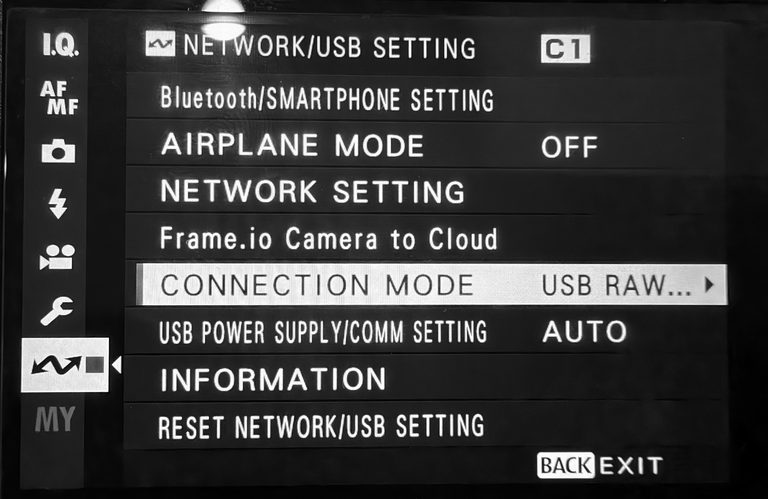
    Camera menu path: Network settings, Connection Mode, USB RAW
    Network settings › Connection Mode › USB RAW
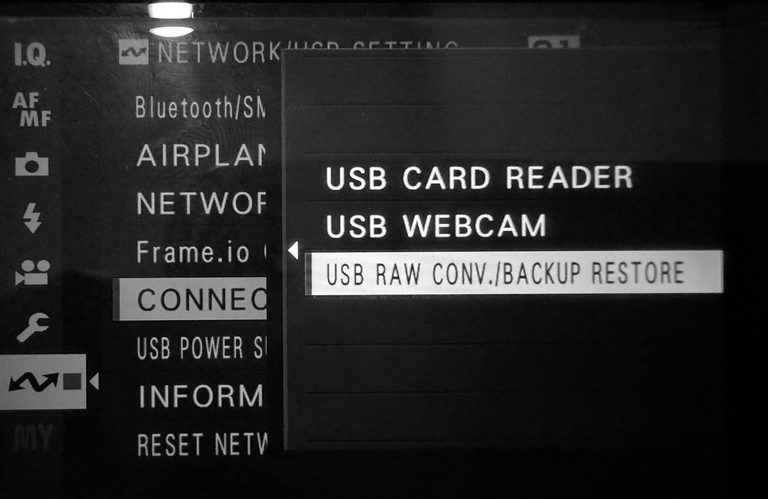
    Camera menu with RAW CONV. selected
    RAW CONV.
  4. 4
    Quit anything else holding it

    Photos on macOS, gvfs on Linux and MTP on Windows take the camera first. Close them, then reconnect.

Nothing connected yet. Steps 2–4 are on the camera; the button below connects it.

Extract Recipe from the Photo

Pick one Fujifilm JPEG. Its recipe is read from the EXIF data, the photo becomes the card's cover, and the recipe is filed under Yours.

More ways to import: a batch of images · recipe cards

    Uploading…

    Import Recipes from Images

    Select one or more Fujifilm JPEG files. The recipe settings encoded in their EXIF data will be extracted and saved — the image files themselves are not stored.

      © 2026 Johnyvino All recipes and photos belong to their original authors — see the credits.